Novapago Pay Request
A merchant can send a payment request to their users.
You will be re-directed from the merchant's website to Novapago.
The page would contain information about your purchase such as order number, merchant name, and price.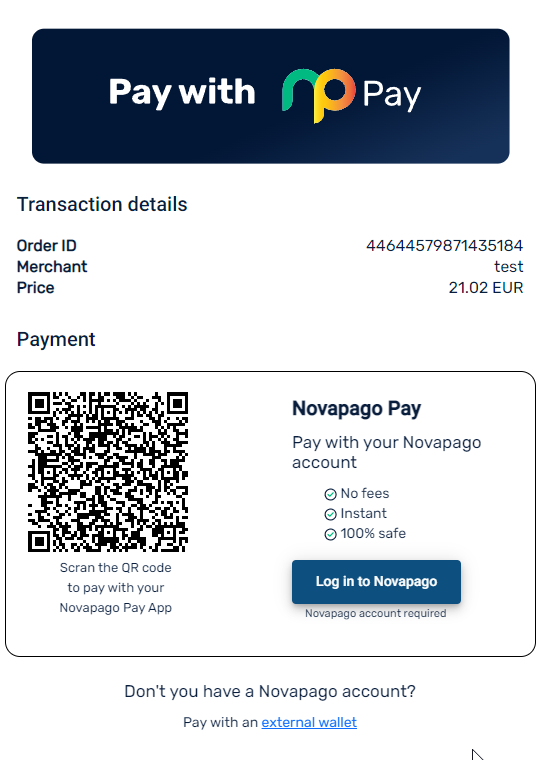
Paying with a Novapago account
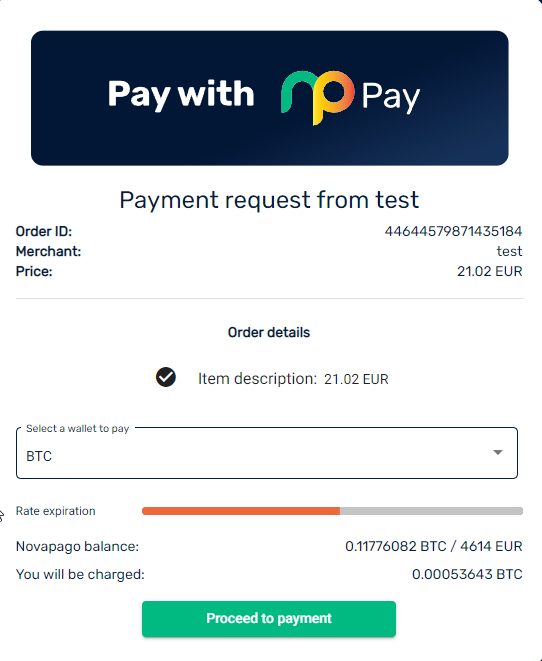
You will be re-directed from the merchant's website to Novapago.
The page would contain information about your purchase such as order number, merchant name, and price.
If you have already have a Novapago account, you can log in using your email and password. If you don't have an account, you can register for one and verify your identity to proceed with the payment. This is the preferred way to use this service. It is quicker, easier, and more secure. Click here to find out how to create a Novapago account.
Paying with a Novapago account
When you have signed in, depending on the balance in your wallet, you will have two options. Either you can proceed to payment if you have enough money in your wallet to cover the order amount. If your balance is lower than the order amount you will have to buy BTC using your card or transfer BTC to your wallet from an external wallet.
You are able to select from which wallet you want the funds to be taken.
When you have selected the wallet you wish to use and have enough money to cover the order amount, please press "Proceed to payment"
This will transfer the money to your merchant and finalize the payment. When the order is complete, you will be directed back to Novapago.
Related Articles
Novapago Pay Report
There is an option to generate a report for your Novapago Pay transactions. This report can be sent to merchants or other users as a way to show that a payment has been made. They would use the link https://novapago.com/document-validation/ and enter ...Is a KYC required to pay a merchant?
We do require you to verify your identity by uploading your ID under your profile. This is required before you can use any of our services.How to make a transfer to another Novapago user
To transfer cryptocurrency to another Novapago user you need to be signed in to your account. How to sign in. Please select "My wallets" in the left menu. At the bottom of the page, you have a list of your wallets. After each cryptocurrency, there is ...How to create a Novapago account
On the main page, press "Login" You will now have the option to press register in the top right corner. Please select a personal account on the left side. This will allow you to enter your personal details. All of the fields marked with a * are ...How to transfer cryptocurrency to an external wallet address
To transfer cryptocurrency to an external wallet address you need to be signed in to your account. How to sign in. Please select "My wallets" in the left menu. At the bottom of the page, you have a list of your wallets. After each cryptocurrency, ...